

JVC DT-N21H 21.5" ProHD Broadcast Studio LED Monitor, 1920x1080, Gold Mount Battery Plate
DT-N21H
|98-DTN21H
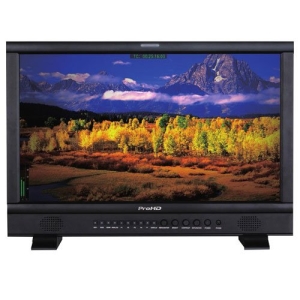
JVC DT-N21H 21.5" ProHD Broadcast Studio LED Monitor, 1920x1080, Gold Mount Battery Plate
DT-N21H | 98-DTN21H
Please sign in to view pricing, availability, and to add to cart.
Product Overview
Supports 3G/HD/SD-SDI and 2K-SDI
DT-N21H supports 3G-SDI (SMPTE 425M) Level-A & B, 2K-SDI (SMPTE 2048-2) 60p Level-A & B display.
• SDI Timecode (LTC, VITC1&2) and AFD info display
• R/G/B/Mono, False color, Zebra stripes display
• Peaking focus assist display mode
• H/V delay, freeze frame display mode
• Safety area selection: 80%, 85%, 90%, 93%, 95%
• Scale marker: 4:3, 13:9, 14:9, 15:9, 1.85:1, 2.35:1
• Native scan, over scan and normal scan selection
• GPI control via RS485 port connection
• 3 User setting data storage
• TALLY light with adjustable brightness
• 4 User definable function keys
• Easy One-key Menu operation
• Built-in speaker (2.5W, 8)
• AntonBauer battery plate for field application (V-mount plate in an option)
Full HD LCD panel with LED backlighting
The monitor features a 1920x1080 pixel full HD resolution LCD panel with LED backlighting, with 178 deg. wide viewing angle (H & V), 1000:1 contrast and 16.7M color depth.
ITU-709 color space
The DT-N21H is compatible with ITU-709 standard color space for HDTV broadcasting.
Selectable gamma preset
The DT-N21H supports gamma preset selection from: 2.2, 2.4 and 2.6.
Audio meters display
The DT-N21H supports SDI/HDMI embedded audio 2-ch meters display and analog audio 2-ch meters display.
TSL UMD control and display
The DT-N21H monitor supports UMD controlling input via RS485 and RS232 port, compatible with TSL 3.1 and 4.0 UMD protocol.
USB firmware upgradable
The Monitor offers a USB port on the rear side, for firmware upgrade. Users can download firmware to a USB disk and the upgrade operation is directly on the monitor, without PC or other adaptors.
Main Features
- Is long-lasting with reduced screen burning to ensure maximum efficiency
- 21.5" viewable screen size provides a lively viewing experience
- 300 Nit brightness gives an exceptional visible display for clear and consistent on-screen pictures
- 21.5" screen size with 1920x1080 resolution provides a native display of a Full HD video sources without any degradation due to down-sampling technologies
- LED backlight technology provides for industry-leading low power consumption and less hazardous materials
- 1920 x 1080 maximum resolution for stunning, lively result with optimal viewing usability
- 16:9 widescreen resolution perfect for watching movies, playing video games and getting on with office work
- HDMI interface allows you to connect to a variety of HD devices including gaming consoles, Blu-ray players, laptop PCs, digital cameras and many others for the ultimate true high-definition display
- VESA mount compatibility offers a convenient and desired mounting solution
- Wide Viewing Angle feature for maximum efficiency and convenience
General Information
Specifications
ADI Part Number 98-DTN21H Brand Name JVC Manufacturer JVCKenwood Corporation Manufacturer Part Number DT-N21H Product Line ProHD Product Model DT-N21H Product Name 21.5" Broadcast Studio LCD Monitor Product Type LCD Monitor
Aspect Ratio 16:9 Backlight Technology LED
Speakers Yes
Number of Screens 1 Screen Size 21"
Operating Power Consumption 32W
HDMI Yes Number of HDMI Inputs 1 Number of HDMI Outputs 1 Number of USB Ports 1 VGA Yes
Depth 3.40" Height 14.10" VESA Mount Compatible Yes VESA Mount Standard 100 x 100 Width 20.70"
Display Screen Type LED Mount Type Desktop Mount, Rack Mount
Brightness (Nit) 250 Graphics Mode Full HD Maximum Resolution 1920 x 1080 Native Contrast Ratio 41.667361111111113
Features Wide Viewing Angle Package Contents - 21.5" Broadcast Studio LCD Monitor
- AC-DC power adaptor (bundled on rear panel)
- Gold mount plate (Pre-installed)
- Desktop stand